WebGPU Devices and Resource Limits: Capability Checks and Device Loss
WebGPU obtains an adapter, checks supported features and limits, and then requests a device for GPU work. This guide explains why capabilities are not guaranteed, how to handle `device.lost`, and what to do when resource validation or allocation fails.
Publication & corrections: infostoa · Editorial standards
Individual author and specialist reviewer information is not provided for this article.
WebGPU lets a browser page request a GPU adapter, inspect capabilities, request a device, and submit GPU commands and resources. The same features and resource sizes are not available on every device. An application should choose a path using the capabilities reported by the adapter and device, and prepare for device loss or resource-creation failure rather than assuming that any GPU-backed operation will succeed.
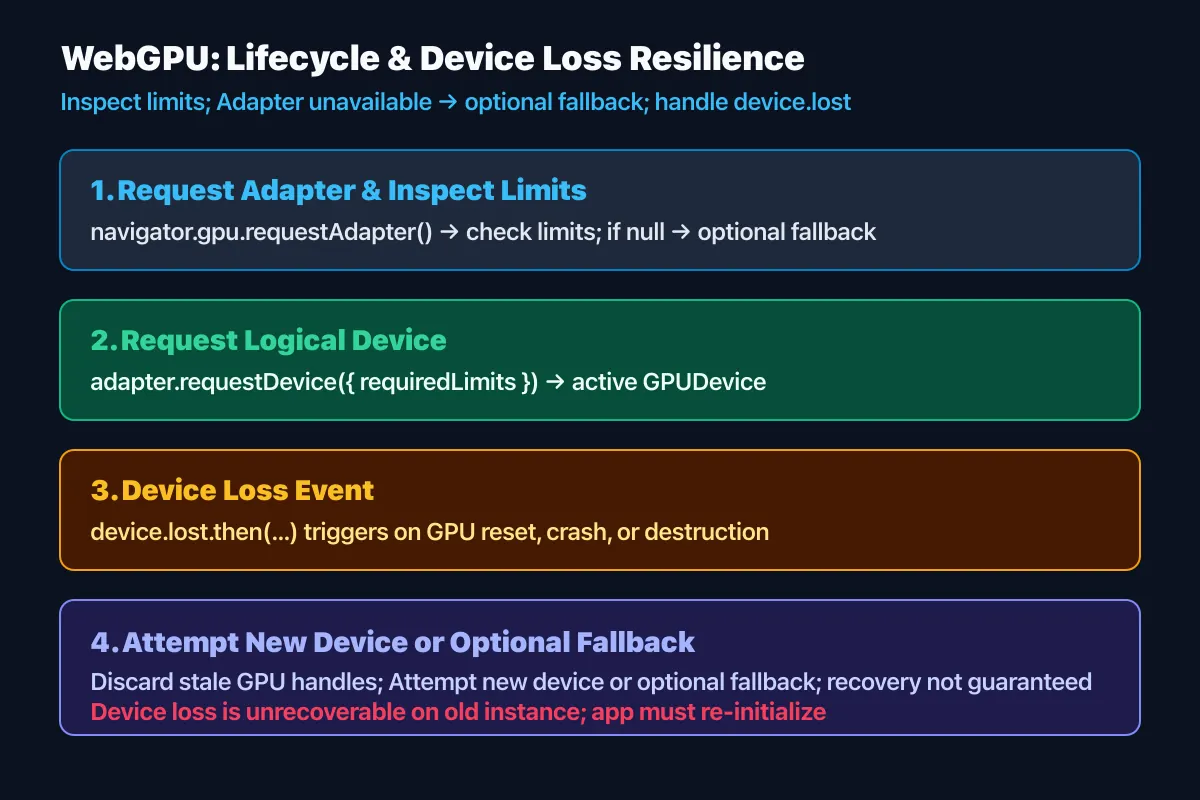
1. From adapter discovery to a device
A page can call navigator.gpu.requestAdapter() to request an available adapter. The result may be absent when no usable GPU is available or browser policy does not expose one, so this should be treated as a supported fallback path. Once an adapter is available, inspect its features and limits. Optional features must be requested explicitly when calling requestDevice(); code should not assume it can use a feature that it did not request and receive.
The device is the main point for creating GPU resources and issuing work. A device request can specify required limits, but a reported limit is not the same thing as a guarantee about total memory that the application can safely allocate. Start from the device's capabilities and request the level the workload needs. If adapter or device acquisition fails, an application can switch to CPU work or a simpler rendering path.
2. What features and limits tell you
Feature and limit values describe what an adapter or device supports and permits. A format, shader capability, or resource size should not be assumed to exist in every user's environment. Requesting an unsupported optional feature can make device creation fail, and creating a resource beyond an allowed limit can produce a validation error. Use optional features conditionally and test boundary values as well as invalid inputs.
Limits are not a complete meter of physical memory available to the page. Browsers abstract differences between hardware and drivers, and resource pressure or system conditions can change between inspection and execution. Reading a value such as maxBufferSize does not prove that the application can allocate many buffers of that size at once. Begin with the required capacity, observe resource creation and GPU errors, and tune to the workload.
3. Responding to device loss and resource errors
The GPUDevice.lost Promise notifies an application when a device is no longer usable. Causes can include a device or driver problem or browser-initiated shutdown. The page should stop work that depends on the old device and, when appropriate, request an adapter and a new device. Recovery is not guaranteed to succeed every time; repeated failure should lead to a reduced-feature path or a safe fallback view.
Validation and execution errors can also occur around command submission. Observing uncaptured GPU error events helps diagnose errors that application code did not handle through a scoped mechanism. Do not assume that a resource remains usable after an error. Isolate resource creation into manageable steps so failures can be localized, and make the user-facing state explicit when the GPU path stops instead of leaving the page frozen.
4. Expert perspective: design for capabilities and recovery
The W3C specification defines adapter and device acquisition, feature and limit requests, resource validation, and device-loss notification. MDN summarizes capability discovery and the API's security and compatibility constraints for developers. Neither source promises identical performance or memory budgets across all WebGPU environments. Test the adapter and device actually returned by the browsers in the deployment matrix.
Structure initialization around steps that can fail, with separate logs and fallback behavior for an absent adapter, a missing feature, device-request failure, limit validation, and device loss. Distinguishing those cases can avoid unnecessary full restarts. Treat GPU execution as optional acceleration and verify a CPU or lower-capability path as well. Capability discovery is evidence for choosing a path in the current environment, not a guarantee that a particular operation will succeed later.