The CSS :has() Selector: Matching Elements by Related Content
CSS `:has()` is a relational pseudo-class that selects an element when a relative-selector condition matches in relation to it. It can express parent-state patterns, but selector scope, specificity, and browser support still matter.
Publication & corrections: infostoa · Editorial standards
Individual author and specialist reviewer information is not provided for this article.
CSS :has() lets a stylesheet select an element when a relative selector matches content or another element in relation to it. For example, article:has(img) matches an article containing an image. It is often called a parent selector, but the definition can express relative relationships beyond just a descendant. Keep the intended relationship explicit instead of applying a broad condition without considering its scope.
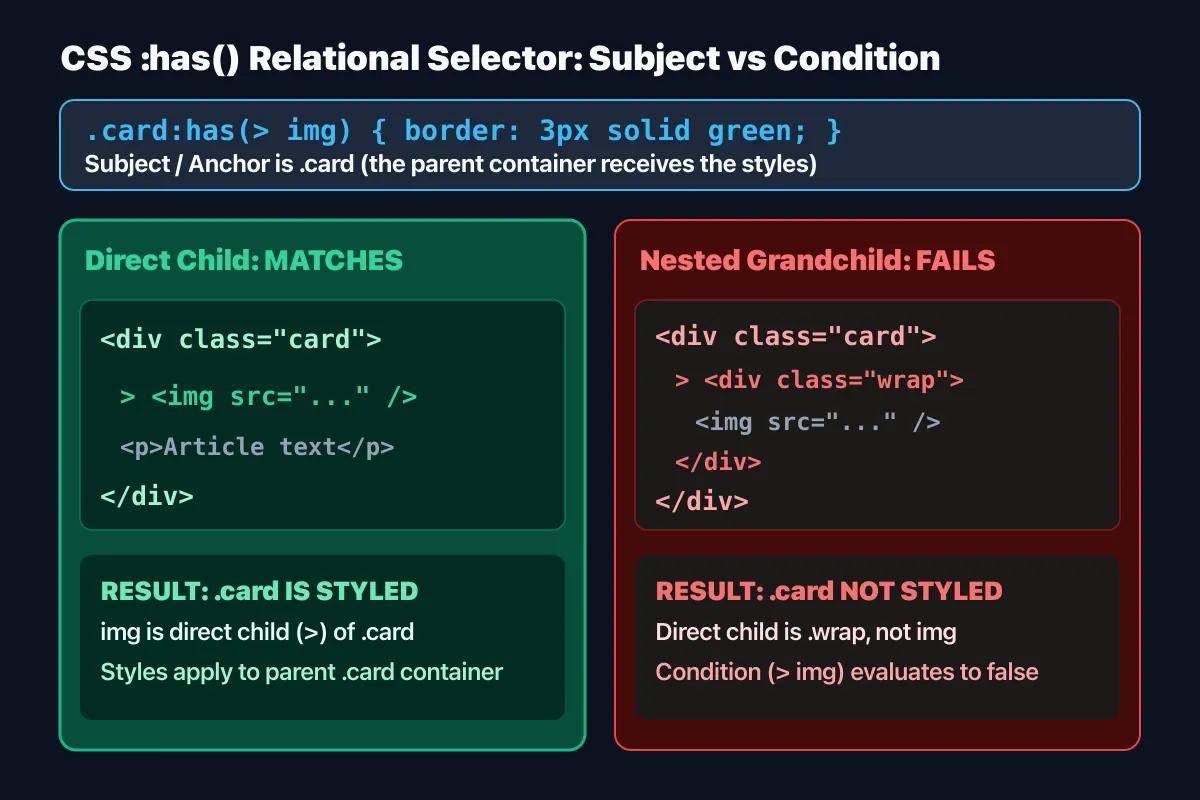
1. The relative selector's anchor
The argument to :has() is a relative selector list. The element being tested is the anchor, and the selector describes a relationship from it. section:has(> h2) therefore finds a section with a heading as a direct child. This is narrower than :has(.error), which can match when an error element exists anywhere below. The rule selects the anchored section, not the descendant that satisfied the condition.
A :has() argument can contain a comma-separated list, allowing a match when one of several conditions is true. Before adding complex logic, decide which ancestor or container should reflect the state. Constraining the relationship makes intent easier to read and reduces surprising matches when component markup changes.
2. Examples with forms and cards
A form can use label:has(input:invalid) to style a label based on a related input state. A card can adjust its presentation when it contains media, or a container can reflect whether a checkbox is selected. These patterns may avoid DOM changes or JavaScript that repeatedly synchronizes a state class. The input's validity still follows HTML form validation rules, and visual styling does not replace explanatory error text or accessible feedback.
Using :has() at a component root can connect an internal element condition to the component's outer layout. For instance, card:has(.thumbnail) can select a card treatment when a thumbnail exists. Use classes or a direct-child combinator where appropriate so that a condition does not accidentally match content in a nested component.
3. Check specificity and real-page behavior
The specificity of :has() is based on the most specific selector in its argument list. Adding a complex argument can therefore create a stronger rule than it appears at a glance. Even when using cascade layers or low-specificity techniques, inspect the winning declaration in browser developer tools. Combining :where() with a relational condition can help control argument specificity, but the target rule and layer order still need review.
There is no single fixed performance cost that follows from the syntax alone. A complicated condition applied across a very broad document can make maintenance and debugging harder. Check the matched elements and results when the DOM changes on a representative page, and scope the selector to the component that needs it. If supported browsers do not all include :has(), a feature query such as @supports selector(:has(*)) can help organize fallback styling.
4. Expert perspective: deciding where it fits
The W3C Selectors specification defines :has() as a relational pseudo-class and specifies how relative selectors are evaluated. MDN's developer guide provides practical examples for form state and content presence and calls out specificity and browser support considerations. This is declarative CSS selector matching, not a script that arbitrarily traverses the DOM backward. Also decide whether a visual style is sufficient or whether the interface needs a separate semantic state or behavior.
Before adopting the selector, identify the anchor element, relative relationship, argument specificity, and supported browser set. Then test representative and nested markup and ensure that accessible state descriptions remain available. A focused relational selector can reduce duplicated state classes; it does not mean every DOM relationship should be encoded in one complicated rule.