CSS Container Queries: Responsive Styles from Component Space
CSS container queries let descendants respond to an ancestor container’s dimensions instead of the viewport. This guide covers query-container setup, axis containment, @container rules, and practical limits.
Publication & corrections: infostoa · Editorial standards
Individual author and specialist reviewer information is not provided for this article.
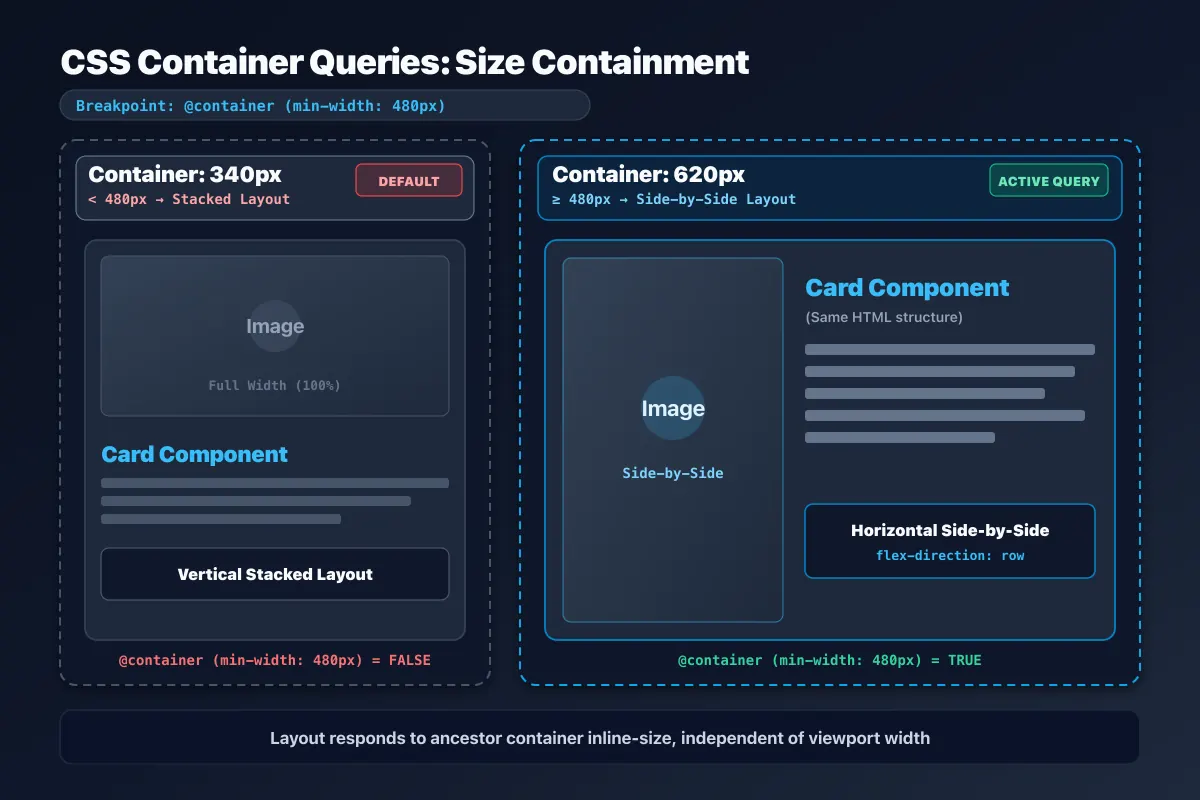
Viewport media queries change styles based on the overall screen. But a reusable card may appear in both a wide article column and a narrow sidebar, even when the browser window has the same width. CSS size container queries let descendants respond to an ancestor query container’s dimensions, so a component can adapt to the space where it is placed.
1. From viewport conditions to component space
Media queries evaluate the viewport or other media features. Container queries evaluate conditions such as the size of a query container inside the document. The same component can therefore use different internal layouts in two columns of one page. This is useful when a component is reused across page layouts and should not depend on a copy of the page-level breakpoint rules.
A size query needs an ancestor declared as a query container with container-type. inline-size enables inline-axis size containment; size applies size containment on both axes. Containment is more than a label: it changes how the container’s size calculation depends on its contents. Check intrinsic sizing and layout before and after adding it. Choose the value according to the axis that the component needs to query and how its own size is determined.
2. Declaring and naming a query container
For many component layouts, container-type: inline-size enables queries based on inline size. Add container-name, or use the container shorthand, when several nested containers exist or the intended one should be explicit. For example, an outer wrapper can be named card, and descendants can use a condition such as @container card (width > 30rem). Without a name, the browser selects the nearest ancestor query container that supports the queried feature.
A query rule styles descendants; it does not use a container’s own size to conditionally style that same container. The rule is evaluated within the ancestor-child relationship. Keep this boundary clear in the DOM and use names where nesting could make the selected container ambiguous. When names are nested, check that each rule refers to the intended component boundary.
3. Conditions and container-relative units
An @container rule can test supported container features such as width or height and apply styles to descendants when the condition matches. If a container is set up only for inline-size containment, make sure the feature you query is supported by that declaration; a block-axis condition may require a different containment choice. Container query length units such as cqi and cqb can express lengths relative to a query container. They depend on the relevant container context and are not universal replacements for viewport units.
Choose thresholds from the component’s content and layout needs rather than copying a device list. A card might place an image beside its text only when the container is wide enough, then stack those elements when it is narrow. Derive the threshold from minimum readable text width, image needs, and the available component space. Keep the rule set small enough that a reviewer can tell which layout changes at each condition.
4. Practitioner perspective: test containment and nesting
First check that the container has the intended size when its descendants contribute content. Then verify which nearest query container each descendant selects and whether nested names remain unambiguous. Test long localized labels, realistic images, and narrow columns. Look for overflow, unexpected shrinking, or a container whose intrinsic size changed after containment was added.
Container queries make components responsive to their placement, but they do not replace every responsive decision. Page-level navigation or transitions tied to the viewport may still belong in media queries. Check the project’s supported browsers and fallback styles directly; a query rule does not by itself establish compatibility.